
The Eisenhower Matrix is a simple way to prioritize tasks by sorting them into four boxes based on two questions: is it urgent, and is it important? Each box tells you what to do: do it now, schedule it, delegate it or drop it. To find which tasks matter most in the first place, use the Pareto principle (80/20 rule). This guide explains how the Eisenhower Matrix works, where it comes from, real examples for work and school, its limits and a free printable Eisenhower Matrix template.
In this article
- What Is the Eisenhower Matrix?
- Where the Eisenhower Matrix Comes From
- The 4 Quadrants Explained
- How to Use the Eisenhower Matrix in 5 Steps
- Eisenhower Matrix Examples
- Free Eisenhower Matrix Template
- When the Eisenhower Matrix Doesn’t Work Well
- Eisenhower Matrix vs Other Methods
- Frequently Asked Questions
- Start With This Week’s List
What Is the Eisenhower Matrix?
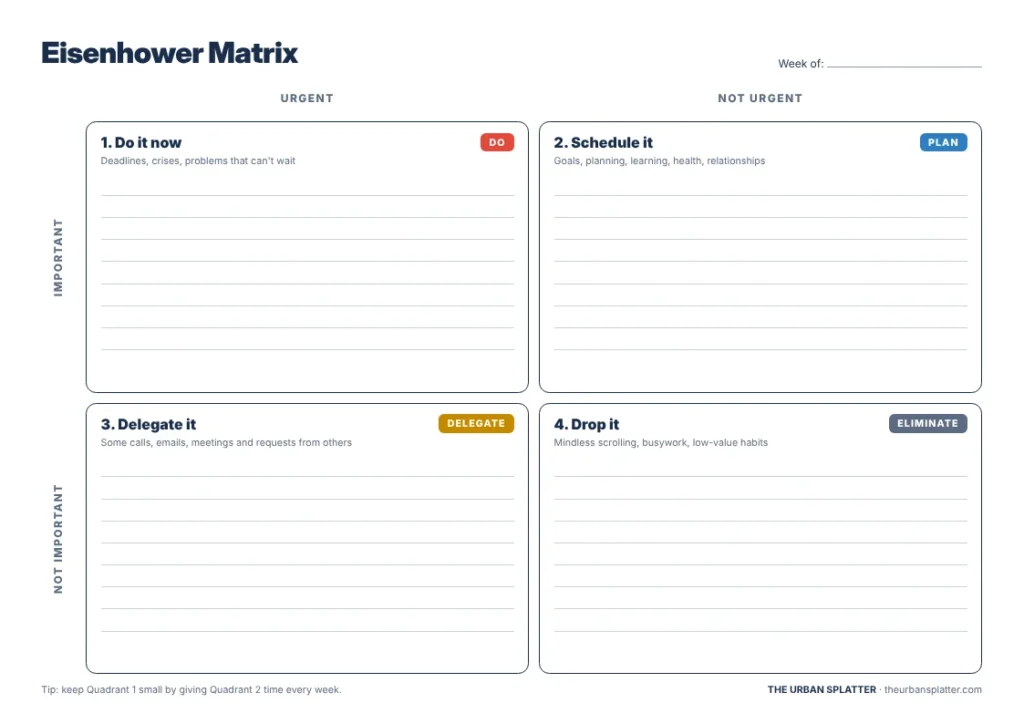
The Eisenhower Matrix, also called the urgent-important matrix or Eisenhower box, is a 2×2 grid for deciding what to work on. Tasks go into one of four quadrants: urgent and important (do), important but not urgent (schedule), urgent but not important (delegate), and neither (eliminate). It helps you spend time on what matters instead of what feels most pressing.
| Urgent | Not urgent | |
|---|---|---|
| Important | Quadrant 1: Do it now | Quadrant 2: Schedule it |
| Not important | Quadrant 3: Delegate it | Quadrant 4: Drop it |
Where the Eisenhower Matrix Comes From
The matrix is named after Dwight D. Eisenhower, the 34th U.S. president. In an August 1954 speech at Northwestern University, he said, “I have two kinds of problems, the urgent and the important. The urgent are not important, and the important are never urgent.” According to Quote Investigator, Eisenhower credited the idea to an unnamed “former college president” rather than claiming it as his own.
Stephen Covey turned the idea into the four-quadrant grid most people use today in his 1989 book The 7 Habits of Highly Effective People, where he called it the Time Management Matrix.
The 4 Quadrants Explained
Quadrant 1: Urgent and important (do it now)
These are deadlines and real problems that need attention today, such as a client report due this afternoon or a broken laptop before a presentation. Handle them first, but aim to keep this box small. A full Quadrant 1 usually means important work was left until it became a crisis.
Quadrant 2: Important but not urgent (schedule it)
This is where long-term progress happens: planning, learning a skill, exercise, relationships and preventive work. Because nothing forces these tasks to happen, they are easy to postpone. Block time for them in your calendar each week. A short morning routine is a good place to fit one of them.
Quadrant 3: Urgent but not important (delegate it)
These tasks feel pressing but do not move your goals forward, such as many emails, some meetings and routine requests from others. Delegate them, batch them into one time slot, or shorten them.
Quadrant 4: Not urgent and not important (drop it)
Mindless scrolling, busywork and low-value habits belong here. Cut them down or remove them completely. Keep genuine rest out of this box, because rest supports the work in the other quadrants.
How to Use the Eisenhower Matrix in 5 Steps
- List everything. Write down every task on your mind for the day or week.
- Ask two questions. For each task: “Does this need doing soon?” (urgent) and “Does this move my goals forward?” (important).
- Sort the tasks. Place each one in a quadrant. Be honest; not everything is important. If you are unsure what counts as important, start from your short-term goals.
- Act by quadrant. Do Quadrant 1, schedule Quadrant 2, delegate or batch Quadrant 3 and drop Quadrant 4.
- Review weekly. Repeat the exercise each week and notice which quadrant keeps growing.
Eisenhower Matrix Examples
For work
| Quadrant | Example tasks for a team manager |
|---|---|
| 1. Do | Fix a client complaint, finish the board report due today |
| 2. Schedule | Plan next quarter, one-to-one meetings with team members, a training course |
| 3. Delegate | Book meeting rooms, answer routine supplier emails, update a shared tracker |
| 4. Drop | Reorganizing desktop folders again, reading every newsletter |
For students
| Quadrant | Example tasks for a student |
|---|---|
| 1. Do | Essay due tomorrow, studying for Friday’s test |
| 2. Schedule | Weekly revision, exercise, reading for next month’s project |
| 3. Delegate or batch | Group chat replies, printing notes, routine admin |
| 4. Drop | Late-night scrolling, rewatching shows during study time |
Free Eisenhower Matrix Template
The free printable template has the four quadrants on one landscape page, with space for about eight tasks in each box and a reminder of what to do with each one. Print it on A4 or US Letter paper and fill it in at the start of each week, or use it on a tablet.
Download the free Eisenhower Matrix template (PDF)
When the Eisenhower Matrix Doesn’t Work Well
The method is simple, which is also its main limit. TechTarget notes a few weak spots:
- Effort is ignored. It does not show how long or hard a task is.
- Long lists get messy. It works best with a handful of tasks per quadrant.
- Not everyone can delegate. People without a team may end up doing Quadrant 3 themselves.
A practical fix is to sort first, then choose your top one to three tasks from Quadrants 1 and 2 for the day, and use a timer to work through them.
Eisenhower Matrix vs Other Methods
| Method | Best for | Works well with the matrix? |
|---|---|---|
| To-do list | Capturing everything | Yes: sort the list into quadrants |
| Pomodoro Technique | Focusing on one task at a time | Yes: use it on Quadrant 1 and 2 tasks |
| Time blocking | Protecting time in a calendar | Yes: block time for Quadrant 2 |
Frequently Asked Questions
What is the difference between urgent and important?
Urgent tasks demand attention now because of a deadline or pressure from someone else. Important tasks contribute to your goals and values, whether or not they have a deadline.
Which quadrant should you focus on most?
Quadrant 2. Regular time on important but not urgent work prevents many Quadrant 1 crises later.
Can you use the Eisenhower Matrix for personal life?
Yes. Sort chores, health, money tasks and family plans the same way. Personal Quadrant 2 tasks often include exercise, sleep and time with family.
Is there an Eisenhower Matrix app?
Many to-do apps let you tag tasks by priority, and some include a four-quadrant view. A paper template or a simple spreadsheet works just as well.
Start With This Week’s List
Write down everything on your plate, sort it into the four quadrants and block time for one Quadrant 2 task this week. That one habit makes the biggest difference. For more practical guides on work and productivity, explore the latest articles on The Urban Splatter.