If you have typed "unblocked games G+" into a search bar, you are probably after a quick browser game you can open on a school or work computer. The trouble is that the terms around it, like "unbanned G+", "G+ games unblocked" and "Classroom G+", are used loosely, and the sites behind them vary a lot in quality. This guide explains what the terms usually mean, why these games get blocked, and how to check a site before you click anything.
What "unblocked games G+" means
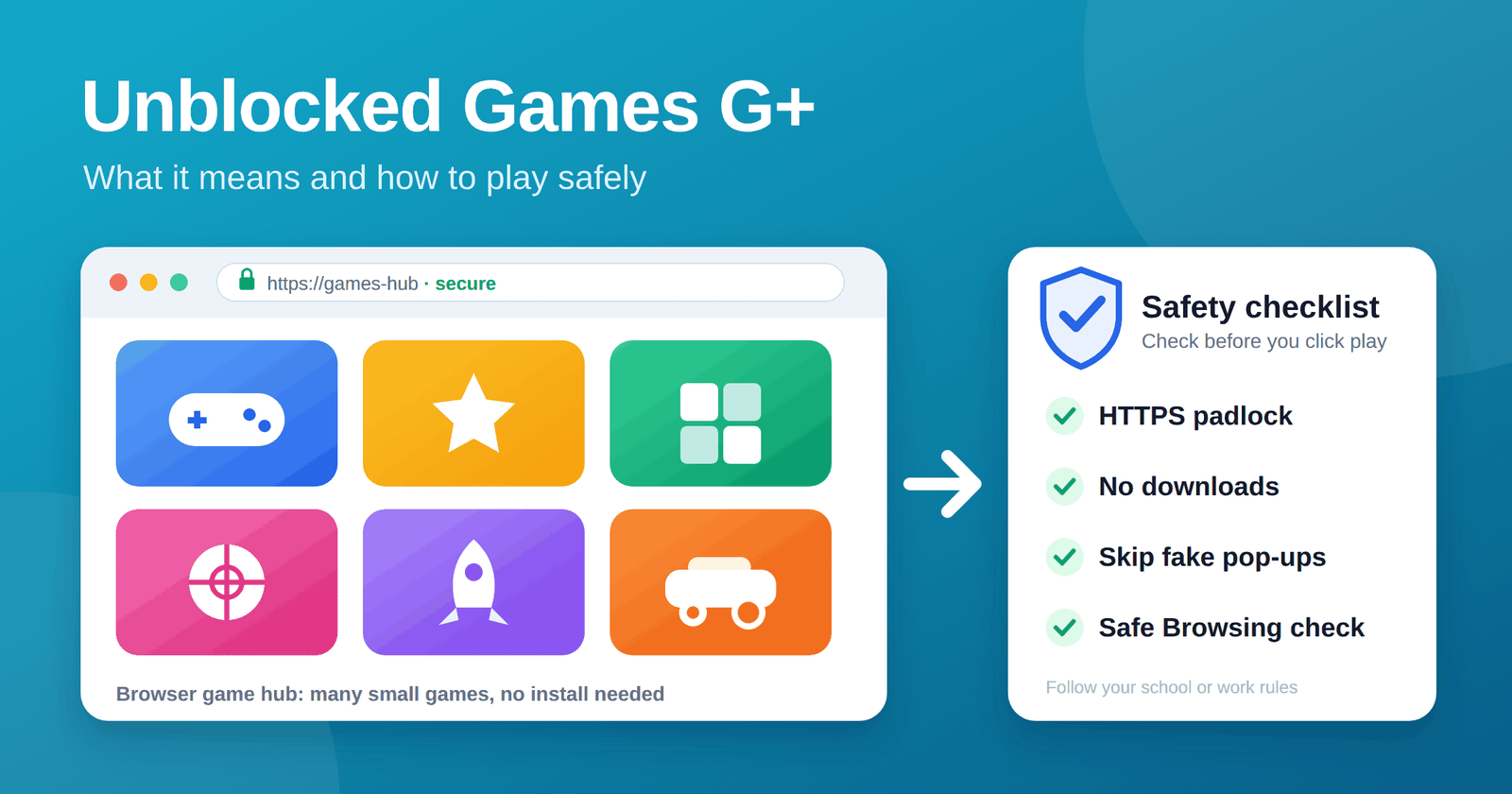
"Unblocked games" is a catch-all label for browser games that run without an install and are not stopped by a school or workplace web filter. "G+" is shorthand players add to find a particular style of game hub: a single page that lists many small games, often with a search box and categories. There is no single official "G+" product, so the label points to a type of site rather than one brand.
Two practical points follow from that:
- Two sites using the same "G+" name may have nothing to do with each other.
- A site that was open last month may be filtered, renamed, or gone today.
"Unbanned G+" and "unbanned G"
Players often use "unbanned" as a synonym for "unblocked". Searches for "unbanned G+" and "unbanned G" usually mean one of two things: a game hub that a school filter has not blocked yet, or a newer address for a hub that stopped loading. Neither phrase tells you the site is safe. It only tells you the site is reachable from where you are searching.
What "Classroom G+" refers to
"Classroom G+" is a search phrase that mixes the idea of a school setting with a game hub. It is not an official part of any learning platform. Treat it as a keyword people use to look for game lists that suit a school-style network. Because the name borrows the word "classroom", it can make a site look more official than it is, so judge the site on its own merits.
Why schools and workplaces block games
- Focus. Games compete with lessons and work tasks.
- Bandwidth. Streaming and heavy browser games slow shared networks.
- Security. Ad-heavy sites are a common route for pop-ups, misleading download buttons, and tracking.
- Policy. Many schools list games in their acceptable use rules, and breaking those rules can have real consequences.
How to play safely
Whatever hub you land on, run through this short checklist before you play:
- Check the rules first. If your school or employer bans games on its network, play at home or on a break where it is allowed.
- Look for HTTPS. The padlock does not prove a site is safe, but a missing one is a red flag.
- Never download anything. Genuine browser games do not need an installer, extension, or "player update".
- Ignore pop-ups and fake buttons. Large "Download" or "Play" buttons that sit outside the game window are often ads.
- Do not sign in with a personal account. Skip any prompt that asks for your school, Google, or email password.
- Check the address. Run the domain through Google's Safe Browsing site status tool to see whether it is flagged for malware or phishing.
- Keep the browser updated. Updates close security holes that bad ads try to use.
Signs of a low-quality game site
- Constant redirects to other pages after one click
- Requests for notification permissions on arrival
- No contact page, no privacy policy, no information about who runs it
- Copied game lists with broken or mislabelled titles
- Prompts to install a browser extension to "unlock" games
The same vetting habits apply to any online service. Our guide on how to evaluate a SaaS tool before you pay covers privacy, support, and ownership checks that work just as well for a game site.
Better ways to play at school
- Ask. Some teachers allow educational or logic games during free periods, and some schools approve specific sites.
- Use approved platforms. Many schools offer games and puzzles through their own learning tools.
- Play off the school network. At home you are not bound by the same filter, and you can use your own device.
Frequently asked questions
Is there an official "G+" games website? No. "G+" is a search label, not a registered platform, so different sites use it for different things.
Does "unbanned" mean a game site is safe? No. It only means the site is currently reachable on that network. Safety depends on the site itself, so run the checks above.
Why does an unblocked games site stop working? Filters are updated regularly, and sites change addresses or shut down. A link that worked last week may not work now.
Are unblocked games legal? Playing a browser game is legal in most places. What matters is your school or workplace policy, and whether the game was published with the creator's permission.
What should I do if a site shows a virus warning? Close the tab, do not click anything, and tell an adult or your IT contact. Clear your browser cache and run a security scan if you downloaded anything.
Related guides in this series
This page is the short version. If you want the detail behind any part of it, these guides go deeper, and each one is written to stand alone:
- Unblocked Games: What They Are and Whether They Are Safe is the main guide, with a 10-step safety checklist and what to do after a bad click.
- Unbanned vs Unblocked Games explains why the two words are used interchangeably and how a ban differs from a block.
- What Is G+ in Gaming? separates G+ game sites from the old Google+ network, which closed in 2019.
- Classroom G+ and Why Games Get Blocked at School covers the law and the filters behind the blocks.
- Safe Free Browser Games You Can Play Without Downloading lists games from sources you can verify.
For the legal background on school filtering, the FCC's guide to the Children's Internet Protection Act is the clearest primary source. If a page ever scares you with a fake virus alert, the FTC's malware guidance explains what to do, and you can report scams at ReportFraud.ftc.gov.
The takeaway
"Unblocked games G+", "unbanned G+" and "Classroom G+" are search shorthand for browser game hubs, not official products. Treat each site on its merits, follow the rules of the network you are on, and use the checklist above before you play or click.